What a forex journal has to get right
A spreadsheet can hold a forex trade. It struggles with everything around it. A standard lot of EURUSD is 100,000 units while a lot of gold is 100 ounces, so the same "1.0" means very different money. Your broker stamps every deal in its own server time, usually two or three hours ahead of UTC and switching with daylight saving. Swaps and commissions arrive as separate lines. And a forex day is often eight or ten short trades, so typing them in by hand is the first habit to break.
SetupBook is built for that. Each symbol has its own contract multiplier, costs are kept apart from the price move, broker times are converted to your own time zone, and the trades can come in without you typing them.
Your MetaTrader 4 and 5 trades, without typing
Add a MetaTrader connection in Settings → Connections and you get a small Expert Advisor and a token. Drop the EA on any chart in your terminal, allow the SetupBook address once in the terminal options, and paste the token. From then on, every closed deal is sent to your journal while the terminal is open: symbol, side, volume, open and close prices, swap, commission and the profit your broker booked.
The EA is read only. It never opens, changes or closes a trade, and it never sees your MetaTrader password. On its first run it sends your history; if the terminal was closed for a few days, it catches up the next time it starts. The broker's server clock is worked out from the terminal itself, so a trade closed at 15:30 server time lands at the right hour in your journal. The platform sync article walks through it screen by screen.
cTrader, a report file, or thirty seconds by hand
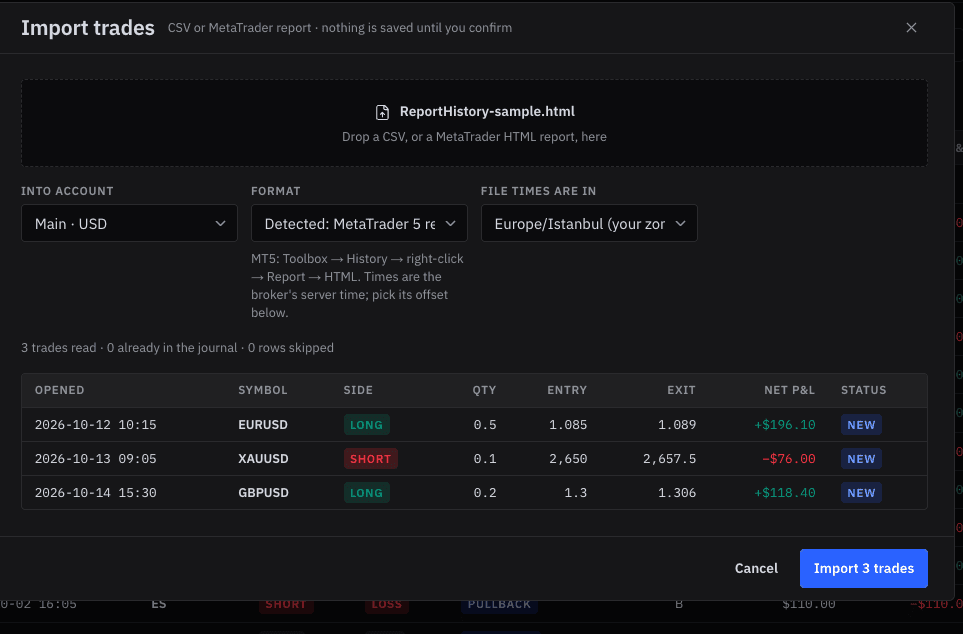
If your broker runs cTrader, connect the account with cTrader's own sign-in; SetupBook pulls the closed deals every hour and whenever you press Sync now. Prefer files? Save the MetaTrader history as an HTML report and import it: the trades are shown before anything is written, and the ones already in your journal are skipped. And when you want to log a trade yourself, symbol, side and result are the only required fields.
Lots, pips and the right multiplier
Quantity is entered in lots, and the symbol's multiplier turns a price move into money: 100,000 for EURUSD, 100 for XAUUSD, whatever your broker uses for an index CFD. With a stop on the trade, SetupBook measures every result in R, the multiple of what you planned to lose, so a 30-pip win on a tight stop and a 30-pip win on a wide one stop looking the same.
The position size calculator in the trade form works the other way round: your balance, the percentage you want to risk, the entry and the stop, and it gives you the lot size that fits. See position size and risk per trade for the arithmetic.
Sessions, pairs and the hours that pay
Tag each trade with its session: Asia, London, New York morning, New York afternoon or off hours. The dashboard breaks the result down by symbol, by strategy and by session, so the question "do I make money in the London open or just trade a lot there?" gets a number instead of a feeling. Most forex traders find one session doing the work and another giving it back.
The cost of the mistakes you repeat
Mark a trade with what went wrong: a moved stop, a FOMO entry, a revenge trade, no stop at all. SetupBook adds up what each mistake cost over the period and shows the share of trades you took cleanly. For a lot of forex traders the largest line on that list is not a bad setup but a rule broken on a good one. The cost of mistakes article explains how the number is built.
Frequently asked questions
Is SetupBook free for forex traders?
Yes. Every feature, unlimited trades and accounts, MetaTrader and cTrader sync included, and no card is asked for.
Does the Expert Advisor place trades or need my password?
No. It only reads closed deals from the terminal it runs in and sends them over HTTPS with your token. It has no trading code and never sees your account password.
Which MetaTrader brokers work?
Any broker on MetaTrader 4 or 5 whose desktop terminal allows Expert Advisors and web requests, which is nearly all of them. The EA runs on the desktop terminal (Windows, or a VPS); the mobile and web terminals cannot run Expert Advisors.
Are swaps and commissions counted?
Yes. Swap, commission and fees from the broker are kept as the trade's costs, and the net result is the profit your broker booked.
Can I keep several accounts, like a live account and a prop challenge?
Yes, as many as you like, each with its own currency and starting balance. A prop account can carry the firm's daily loss limit, drawdown and profit target; see the prop firm trading journal.