Set the rules once, per account
Create an account of type Prop with the starting balance of the challenge and up to three rules: the daily loss limit, the maximum drawdown and the profit target, all in money. A $100,000 challenge with a 5% daily limit, a 10% maximum loss and a 10% target is $5,000, $10,000 and $10,000. Each challenge, phase or funded account is its own account in SetupBook, with its own rules and its own history, and you switch between them in the top bar.
Three meters on the dashboard
With a prop account selected, the dashboard shows how much of each rule is used: today's loss against the daily limit, the distance below your peak balance against the maximum drawdown, and the progress towards the target. A meter turns orange at 80% of a limit and red once it is reached. It is the one view most traders keep checking during a session, and the reason to keep the journal open while you trade rather than after.
A warning before the trade, not after
When you log a trade with a risk amount on a prop account, the form compares it with what is left. If the planned risk is more than the room left in today's loss limit, or more than the distance to the maximum drawdown, the form says so before you save. That is the moment the rule matters: one sentence on the screen while the order is still a plan.
Size from the rule, not from the feeling
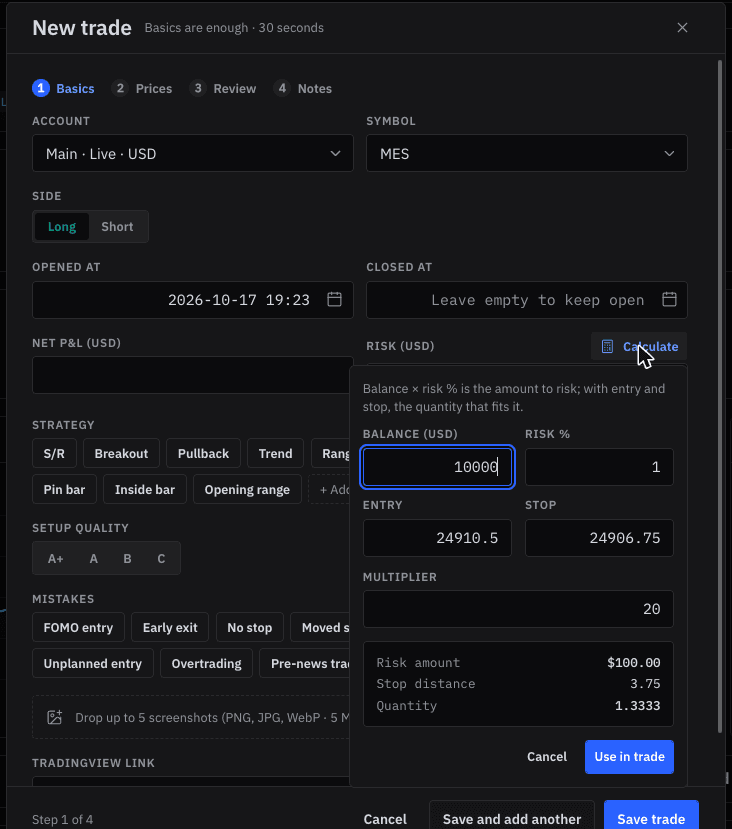
The position size calculator in the trade form starts from the rule. Enter the balance and the percentage you allow yourself per trade, say 0.5%, then the entry and the stop, and it returns the risk in money and the quantity that fits. The risk per trade entry explains why most funded traders stay between 0.25% and 1%.
Getting the trades in
Many forex and CFD prop firms run MetaTrader 4, MetaTrader 5 or cTrader, and those connect like any broker account: a read-only Expert Advisor for MetaTrader, cTrader's own sign-in for cTrader. Give each challenge or funded account its own connection. When you move to the next phase on a new login, add a new connection for it, so the phases stay apart. Firms on other platforms, including futures firms on Rithmic or Tradovate, can import a CSV export or log trades by hand in thirty seconds.
How SetupBook counts, and where your firm may differ
SetupBook counts today's loss from the trades closed today in your own time zone, and the drawdown from the highest closed balance of the account. Firms differ: many include open positions at their current price, reset the day at their own server midnight, or measure the maximum loss from the starting balance rather than the peak. Measured from the peak, SetupBook's drawdown is the stricter of the two. Treat the meters as an early warning and your firm's dashboard as the final word. The prop firm article goes through the rules firm by firm.
Frequently asked questions
Is SetupBook free for prop traders?
Yes. Every feature, unlimited accounts, the prop rules and platform sync included, and no card is asked for.
Does the MetaTrader Expert Advisor break prop firm rules?
It does not trade: it only reads closed deals and sends them to your journal. EA rules differ between firms, so check your firm's policy if you are unsure.
Can I track several challenges at once?
Yes. Each challenge, phase and funded account is a separate Prop account with its own rules. Accounts in the same currency can also be viewed together.
What happens to a failed challenge?
Archive the account. It leaves the account switcher and the combined view, its trades are kept, and you can bring it back at any time.
Does it work for futures prop firms?
The rules work the same way. Trades from Rithmic, Tradovate or NinjaTrader are not synced; import them from a CSV export or log them by hand.