KuCoin has no switch called "read-only". Its read-only key is the one with the General permission and nothing else. SetupBook reads your fills with such a key, so your USDT-M futures and spot trades arrive in your journal without any typing. KuCoin also asks for a passphrase when you create the key, and SetupBook needs it. It takes about five minutes.
This guide shows each step with pictures. For how every platform connects, read the overview of all connections. If you also use MEXC, see the MEXC guide.
Before you start
- A SetupBook account with Pro. Connecting a platform is part of Pro, and every journal starts with 14 days of it: start 14 days free.
- A KuCoin account. KuCoin asks for a security check when you create a key: your trading password, plus a code from your email and from your authenticator app.
- A place to write down the passphrase, such as a password manager.
- Five minutes.
The key only reads. You tick General and leave Spot, Futures, Margin, Earn and Withdrawal off. SetupBook never places an order and never moves money. It stores the key and the passphrase sealed on the server and uses them to read your fills.
1. Open API Management and create a key
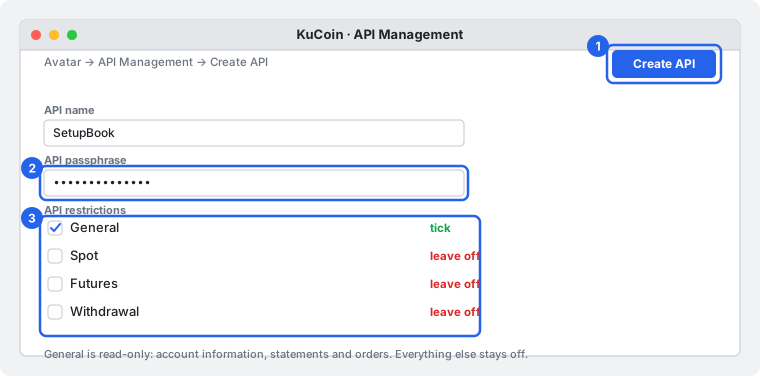
On the KuCoin website click your avatar, choose API Management and press Create API. KuCoin asks what the key is for: choose API Trading, the option that creates a key of your own. Then type an API name (call it SetupBook) and an API passphrase.
2. Tick General and nothing else
In the permissions step tick General. KuCoin describes it as limited to read-only actions: account information, statements and order information. Leave Spot, Futures, Margin, Earn and Withdrawal off, and leave any other box off too. The words on the form may differ a little from region to region (the EU site calls this step API Restrictions), so look for the General box.
IP restriction: KuCoin's help says a key that trades must be tied to an IP address. Yours does not trade, so leave the restriction off. If the form insists on one anyway, ask us through the feedback form under the connections: we cannot give you a fixed address to allow yet. With a read-only key nothing can be traded or withdrawn either way.
3. Copy the key, the secret and the passphrase
Confirm the security check. KuCoin shows the API key and the secret. Copy both into a safe place, together with your passphrase. KuCoin cannot recover any of the three once lost, so if you lose one, make a new key.
4. Paste all three into SetupBook
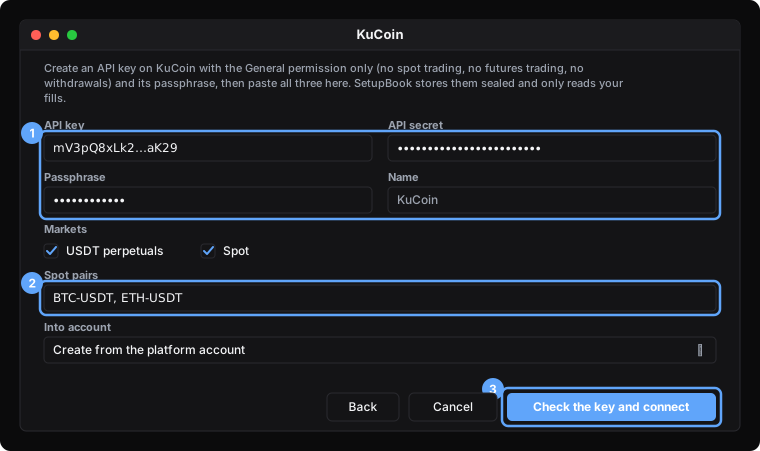
In SetupBook open Accounts → Connections and press Add connection. Choose KuCoin. Paste the key into API key, the secret into API secret and the passphrase into Passphrase.
Under Markets tick what you trade: USDT perpetuals (USDT-M futures) and Spot. For spot, KuCoin has no "what did I trade" call, so write the pairs you trade in Spot pairs, separated by commas, for example BTC-USDT, ETH-USDT. Pairs of coins you hold are added by themselves. Futures need no list.
Leave Into account on Create from the platform account, or pick one of yours, and press Check the key and connect.
KuCoin does not tell a key's permissions to the key itself, so SetupBook cannot warn you if you ticked a trading box by mistake. Look at the key's permissions on KuCoin once to be sure.
5. Watch the first sync
The first sync starts at once. Futures reach about three months back; spot is read pair by pair for as far as KuCoin serves it. When it finishes, the connection shows Active, the time of the last sync and the number of trades. After that SetupBook looks for new fills every hour, and you can press Sync now at any moment.

What you get:
- Positions, not loose fills. Fills are grouped into positions the same way as the file import, so a position closed in three parts is one trade with three exits.
- Contract size. A futures contract is worth a fixed amount of the coin (the BTC contract XBTUSDTM is 0.001 BTC), and SetupBook uses that, so the size and the result match KuCoin.
- Locked fields. Symbol, side, times, prices, size, fees and the net result come from KuCoin and stay exact (they feed your net P&L). Plan, setup quality, mistakes, notes and screenshots stay yours.
- Time zone. KuCoin times are UTC, so there is nothing to set.
- Not included. Coin-margined (inverse) contracts and funding payments are not read.
Demo or live
SetupBook connects KuCoin live accounts only. KuCoin has no demo trading that SetupBook can read.
Replacing a key
Open the connection's menu, choose Edit and press Replace the key. Paste the new key, secret and passphrase and save: SetupBook checks them, forgets the old ones and uses the new ones from the next sync. The trades stay.
Problems
Trouble connecting? Write to us from the connections page with what you tried. We answer by email within 30 minutes, every day.
Frequently asked questions
Is it safe? Can SetupBook trade or withdraw?
No. A key with only General cannot place an order or withdraw, and SetupBook has no code that tries. The key and the passphrase are stored sealed on the server and are never sent to your browser. To stop, delete the key on KuCoin and the connection stops.
Why does SetupBook need the passphrase?
KuCoin signs every request with the passphrase as well as the key and the secret. Without it KuCoin rejects the request. You chose the passphrase yourself when you made the key.
Do I need to restrict the IP address?
No. Leave it off. We cannot give you a fixed address to allow yet; if you want one, ask us in the feedback form. A read-only key cannot trade or withdraw with or without an IP rule.
Why do I have to list my spot pairs?
KuCoin has no call that returns the spot pairs you traded. You list the pairs, and SetupBook adds the pairs of coins you hold on top. Futures need no list.
Does it cost anything?
Connecting is part of Pro. Every journal starts with 14 days of Pro, and nothing is charged in those 14 days. Cancel before they end and you stay on the free plan, which keeps manual entry.
Prefer a file? The import still works: see the user guide. To connect another exchange, read the Hyperliquid guide.